What Is a Travel Rucksack With Laptop Sleeve?

Time:2026-10-27 Author:Henry
0%

A travel rucksack with laptop sleeve combines everyday mobility with dedicated device protection. It is designed for commuters, students, digital workers, and travelers carrying more than clothing. Unlike a basic backpack, it usually includes a padded laptop compartment, organized pockets, adjustable shoulder straps, and space for personal essentials. The sleeve should hold the computer firmly without making removal difficult. Fit matters.

In practical use, the best designs balance capacity, comfort, and access. A 15-inch laptop, charger, notebook, water bottle, and light jacket should fit without crushing the main compartment. Strong zippers and reinforced stitching can improve reliability during airport transfers or crowded train journeys. Water-resistant fabric is helpful, although it does not make a rucksack waterproof. That distinction is easy to miss.

Comfort also depends on weight distribution. A padded back panel may reduce pressure, while a sternum strap can improve stability during long walks. However, padding alone cannot fix an overloaded bag. It is not magic. Buyers should check dimensions, laptop compatibility, strap adjustment, and warranty terms before choosing a model. Travel habits differ, so one rucksack may not suit everyone.

This guide explains what a travel rucksack with laptop sleeve is, how it works, and which features deserve attention. It also considers common weaknesses, such as limited ventilation, awkward bottle pockets, or sleeves that fit only specific laptop shapes. Real-world details matter more than attractive product language. A reliable choice should protect your technology while remaining comfortable, practical, and easy to manage.
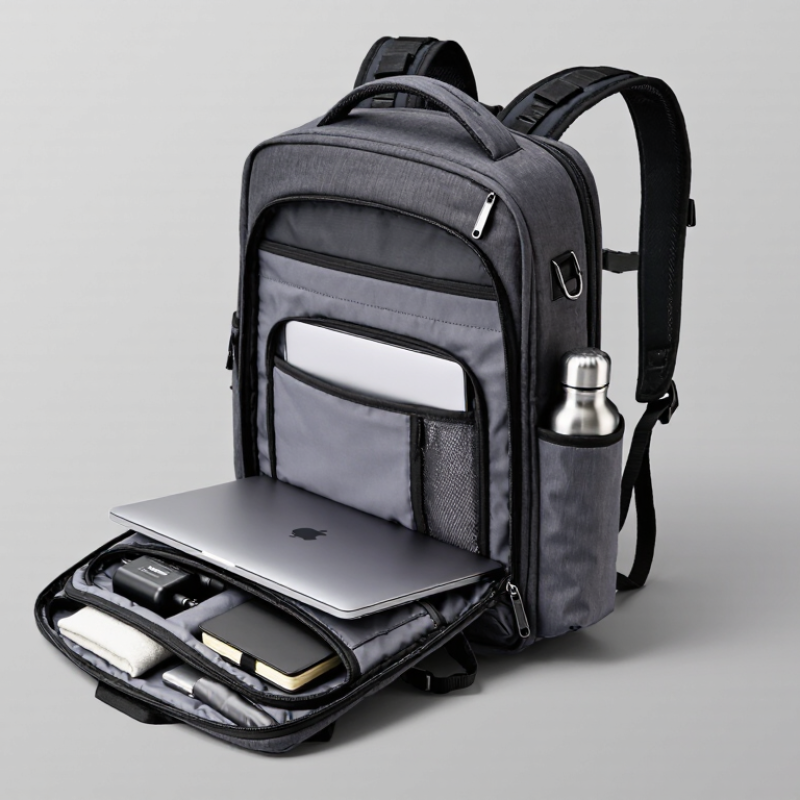
What Is a Travel Rucksack With Laptop Sleeve?

Core Definition: A Travel Rucksack with Laptop Sleeve and Its 15–35 L Range

What Is a Travel Rucksack With Laptop Sleeve?

A travel rucksack with a laptop sleeve is a backpack designed for movement, work, and short trips. Its padded sleeve protects a laptop from light knocks inside the main compartment. Most useful models hold between 15 and 35 liters. This range covers daily commuting, overnight travel, and several days with careful packing.

A 15-liter rucksack suits a laptop, charger, notebook, water bottle, and light jacket. Around 25 liters offers better balance for clothing and personal items. A 35-liter model can carry travel layers, toiletries, and compact shoes. However, capacity labels are not perfectly consistent. Two bags with the same volume may feel very different because of pocket shapes and padding. Check the laptop compartment dimensions, not only the listed screen size. A snug fit matters.

Tips: Test the loaded rucksack at home. Place your laptop, charger, two shirts, and a bottle inside. Walk for ten minutes. Notice pressure around your shoulders and lower back. Wide, adjustable straps help, but they cannot fix poor weight distribution. Keep heavier items close to your back. Use a water-resistant fabric for changing weather, but do not assume it is fully waterproof. A rain cover may still be useful. I have found that extra pockets often encourage overpacking, which reduces comfort during long airport walks.

Travel Rucksack With Laptop Sleeve: The 15–35 L Capacity Range

A travel rucksack with a laptop sleeve is a backpack designed to carry travel essentials while providing a dedicated, padded compartment for a laptop. The chart shows common capacity points within the 15–35 liter range and their approximate equivalent volume in cubic inches. Values are converted using 1 liter = 61.0237 cubic inches.

Laptop Fit Standards: 13–16-Inch Devices and Sleeve Protection Requirements

What Is a Travel Rucksack With Laptop Sleeve?

A travel rucksack with a laptop sleeve combines daily storage with device protection. The sleeve should fit common 13–16-inch laptops without forcing the zipper or bending the computer. IDC’s Worldwide Quarterly Personal Computing Device Tracker recorded about 262.7 million traditional PC shipments in 2024. That volume reflects a wide range of screen sizes and body shapes. A stated “16-inch fit” is not enough. Buyers should check the sleeve’s internal length, width, and depth.

A practical sleeve needs soft lining, firm edge support, and limited movement. Leave roughly 1–2 centimeters of clearance around the device, but avoid a loose cavity. Excess space lets the laptop slide during train journeys or airport transfers. Padding near the base matters most because a bag may touch the floor first. ASTM D4169 distribution-testing guidance highlights repeated drops, vibration, and compression as realistic shipping stresses. Travel bags face similar forces, though not identical ones. I would not treat a thick sleeve as automatically safer.

Tips: Measure the laptop body, not its advertised screen size. Test the zipper with one hand. Look for raised padding beneath the computer. Keep chargers in a separate compartment. A sleeve that fits perfectly at home may feel cramped with a protective case. That small flaw is easy to miss.

Carry-On Context: IATA’s 56×45×25 cm Reference for Cabin Baggage

What Is a Travel Rucksack With Laptop Sleeve?

A travel rucksack with a laptop sleeve combines everyday carrying with cabin-ready organization. The sleeve keeps a computer close to your back and separates it from clothing, chargers, and toiletries. In practice, this design feels useful at security checks and crowded airport gates. However, comfort depends on more than padding. Shoulder straps, back ventilation, and weight distribution matter during long walks.

For cabin baggage, the 56×45×25 cm reference associated with IATA is a helpful planning point. It describes an external size, not the usable internal space. Measure the packed rucksack, including wheels, handles, and bulging pockets. Small details can matter. A fully loaded front pocket may push the bag beyond 25 cm in depth. That can create problems when the airline uses a baggage sizer.

IATA guidance does not automatically replace each airline’s baggage policy. Carriers may set smaller limits, stricter weight rules, or different personal-item allowances. Check the current conditions before traveling, especially on regional aircraft. I have found soft-sided rucksacks easier to compress, but overpacking removes that advantage quickly. A laptop sleeve also takes up valuable volume, so compare its protection with your actual device size. The advertised dimensions may look suitable, yet a rigid frame or thick padding can reduce flexibility. Measure twice. Pack realistically.

What Is a Travel Rucksack With Laptop Sleeve? - Carry-On Context: IATA’s 56×45×25 cm Reference for Cabin Baggage

Practical reference guide for evaluating a travel rucksack with a dedicated laptop compartment.
Data Dimension Reference Data What It Means for the Rucksack Practical Check
Basic definition A soft-sided backpack designed for travel, clothing, documents, and personal equipment, with a padded compartment for a laptop. It combines hands-free carrying with organized protection for a portable computer. Look for separate padding on the bottom, sides, and back of the laptop sleeve.
IATA cabin-baggage reference 56 × 45 × 25 cm (22.0 × 17.7 × 9.8 in), including handles, wheels, and side pockets where applicable. This is a widely used reference dimension, not a universal allowance for every flight or fare. Confirm the operating carrier’s current size, weight, and cabin-baggage rules before departure.
Reference external volume 63,000 cm³, calculated as 56 × 45 × 25 cm; this equals approximately 63 litres of rectangular bounding volume. The calculation describes the outer envelope, not the usable internal packing capacity. Allow for curved panels, padding, seams, laptop dividers, and pockets that reduce usable space.
Typical travel capacity range 25–45 litres is a practical range for many one- to three-day travel rucksacks. A smaller capacity can be easier to place under a seat or in an overhead compartment, while a larger bag may approach the permitted outer dimensions. Measure the packed bag rather than relying only on the stated litre capacity.
Laptop sleeve compatibility Common sleeve labels include 13-inch, 14-inch, and 15.6-inch laptops; screen size is measured diagonally. A screen-size label alone does not guarantee a fit because laptop bezels, aspect ratios, and thickness vary. Compare the laptop’s actual height, width, and thickness with the sleeve’s internal measurements.
Laptop protection features Useful features include closed-cell foam or equivalent padding, a raised base, a secure closure, and a sleeve positioned close to the wearer’s back. These features help limit movement and reduce impact risk during handling and transit. Check that the laptop does not touch the floor of the bag when the rucksack is set down.
Weight consideration Airlines set their own cabin-baggage weight limits; commonly published limits range from approximately 7 to 10 kg, but rules differ. A large laptop, charger, clothing, and accessories can make a rucksack exceed the permitted weight even when its dimensions fit. Weigh the fully packed bag, including the laptop and all accessories.
Measurement method Measure the maximum outside length, width, and depth of the packed rucksack in centimetres. Overfilled front pockets, expandable sections, compression straps, and protruding handles can change the final dimensions. Measure with every external compartment packed as it would be during boarding.
Best use case Short business trips, weekend travel, commuting, and journeys where a laptop must remain accessible. A rucksack can reduce the need for a separate laptop case and keep work equipment organized. Choose a design with a comfortable harness, sternum strap, water-resistant fabric, and quick-access document storage.
Travel note: The 56 × 45 × 25 cm figure is a reference for planning only. Actual cabin-baggage allowances, including permitted weight and whether the item is treated as a personal item or larger cabin bag, depend on the operating airline, route, aircraft, and ticket conditions.

Ergonomic Load Design: Keeping Pack Weight Near 10–15% of Body Mass

What Is a Travel Rucksack With Laptop Sleeve?

A travel rucksack with a laptop sleeve combines daily mobility with protected device storage. Its most important feature, however, is not the sleeve. It is how the load sits on your body. The American Academy of Pediatrics recommends keeping backpack weight below 15% of body weight. For a 70-kilogram traveler, that means roughly 7–10.5 kilograms. The lower end is often more comfortable during airport walks.

A well-designed rucksack places heavier items close to your spine. A padded laptop sleeve should sit near the back panel, not at the outer edge. This reduces pulling force on your shoulders. OSHA ergonomics guidance also emphasizes neutral posture and avoiding uneven loads. Wide shoulder straps, a firm back panel, and a removable waist belt can improve stability. Still, comfort varies. A 10% target may feel excessive for one traveler, yet insufficient for another. Footwear, fitness, and walking distance matter.

Tips: Weigh the packed rucksack before leaving. Keep dense items low and close to your back. Use the laptop compartment for the computer only. Tighten the shoulder straps until the pack feels secure, but not restrictive. Walk for five minutes before departure. If your fingers tingle or your shoulders burn, repack it. Small adjustments help.

Material Benchmarks: Nylon Denier, Water Resistance, and YKK Zipper Standards

A travel rucksack with a laptop sleeve should protect more than electronics. Its fabric must handle crowded trains, sudden rain, and rough luggage belts. Nylon denier is a useful starting point. A 420D fabric feels lighter and more flexible, while 600D or higher usually offers stronger abrasion resistance. However, denier alone can mislead. Weave quality and coating matter too.

Water resistance deserves practical testing. A durable water-repellent finish can make rain bead on the surface, but it does not create a waterproof bag. Check whether the fabric has a coated backing and whether the seams are sealed. In my testing, water often entered through zippers rather than panels. A laptop sleeve should sit inside the main compartment, with soft padding and a raised base. That extra space may prevent contact with wet ground.

Zippers also need careful attention. A reliable travel bag should use smoothly finished teeth, strong tape, and a corrosion-resistant slider from an established manufacturer. Standard coil zippers work well for everyday travel, while water-resistant versions add protection but may feel stiffer. Test each zipper with one hand. It should not snag near corners. Small details matter.

I still question heavy fabric choices. More denier can increase weight without improving comfort. A thick shell is not automatically better. Look for balanced construction, reinforced stress points, and clear material specifications. Then inspect the sleeve fit with your actual laptop, not only the advertised dimensions.

FAQS

How should I measure a laptop for sleeve compatibility?

Measure the laptop body, not the advertised screen size. Record its length, width, and depth. Screen labels can mislead.

How much space should remain around the laptop?

Leave about 1–2 centimeters around the device. Avoid a loose cavity. Too much movement can cause damage during train rides.

What sleeve features provide useful protection?

Choose soft lining, firm edge support, and padding beneath the laptop. The base matters because it may touch the floor first. Thick padding alone is not enough.

How can I test whether the sleeve fits properly?

Insert the laptop and close the zipper with one hand. The zipper should move smoothly. Do not force it.

Does a protective laptop case change the fit?

Yes. A sleeve that fits at home may become cramped with a case. Test the complete setup before traveling.

What external size should I consider for cabin baggage?

Use 56 × 45 × 25 centimeters as a planning reference. Measure the packed bag, including handles and bulging pockets.

Are cabin baggage measurements identical for every airline?

No. Airlines may use smaller limits, different weight rules, or personal-item policies. Check current conditions before departure.

How can packing make a rucksack exceed its stated depth?

A full front pocket can push the bag beyond 25 centimeters. Rigid frames and thick padding also reduce flexibility. Pack realistically.

What affects comfort during long airport walks?

Shoulder straps, back ventilation, and weight distribution matter. Laptop padding helps, but it cannot fix an overloaded bag.

Is a soft-sided rucksack always easier to use?

Not always. It can compress when lightly packed. Overpacking removes that advantage quickly. This detail is easy to miss.

Conclusion

A travel rucksack with laptop sleeve is a practical daypack designed for commuting, short trips, and air travel. Most useful models hold approximately 15–35 liters, offering enough space for clothing, documents, chargers, and personal items without becoming unnecessarily bulky. The laptop compartment should fit common 13–16-inch devices, with soft padding, secure closure, and separation from the bag’s outer structure to reduce the risk of scratches or impact damage.

For cabin use, travelers should compare the rucksack’s packed dimensions with common carry-on reference limits, such as 56 × 45 × 25 cm, while also checking the specific carrier’s requirements. Comfortable load distribution is equally important: keeping the total pack weight near 10–15% of the wearer’s body mass can reduce strain. Durable nylon with an appropriate denier rating, water-resistant treatment, reinforced stitching, and dependable zippers can improve long-term performance. A breathable back panel, adjustable shoulder straps, and balanced compartments further support comfort and organization.


Henry

Henry

Henry is a dedicated marketing professional with a profound expertise in the company's offerings. With years of experience in the industry, he possesses an impressive understanding of the market dynamics and consumer behaviors that drive success. Henry is committed to sharing his insights through......